

Documentation: Smart Home Integrations
Here you will find detailed instructions for integrating the Abfall-Abfrage Converter into various smart home systems. Select the desired system from the tabs below.
Loxone Integration
Personalised guide
Enter your code – this page then shows your JSON URL, upcoming collections and ready-made command recognition. The last code is remembered so you do not have to type it every time. Without a code, the general guide stays.
From this time (Europe/Vienna) today’s collection is treated as done. Default 12:00, e.g. 10:00 if the bin is collected in the morning. The JSON URL then includes &day_switch_time=10:00.
Prerequisites
- Loxone Miniserver (all generations)
- Loxone Config software (free download from loxone.com)
- Your personal link code from the Abfall-Abfrage Converter
- Miniserver Gen. 1 cannot use HTTPS: use the HTTP URL on
legacy.abfall-abfrage.com(same JSON). Gen. 2 and newer use the normal HTTPS URL.
Step-by-step setup
-
Create a Virtual Input: Create a new Virtual Input and paste the matching JSON URL into the URL field.
Miniserver Gen. 2 and newer (HTTPS):
Miniserver Gen. 1 (HTTP only):
Gen. 1 cannot use HTTPS. The legacy URL returns the same JSON unencrypted. In Loxone Config paste the
http://address – not thehttps://one.Polling cycle:
3600seconds. On collection day the date switches after 12:00 (Europe/Vienna). Earlier: append&day_switch_time=10:00to the URL.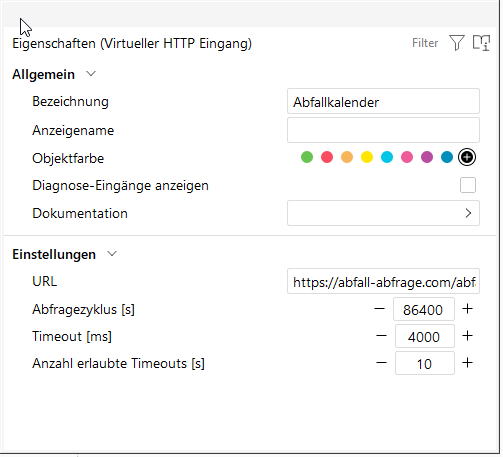
-
Command for the date: Add a “Virtual HTTP Input Command” to the virtual input. Command recognition only gets the date pattern (
unix_date).The text in quotes must be exactly the
titlefrom your JSON API (capitalisation, spaces, umlauts). Example if it says Altpapier:{ "title": "Altpapier", "unix_date": 1787738400, "date": "26.08.2026" }Paste this into command recognition – replace “Altpapier” with your real title if it differs:
\i"title": "Altpapier"\i\i"unix_date":\i\v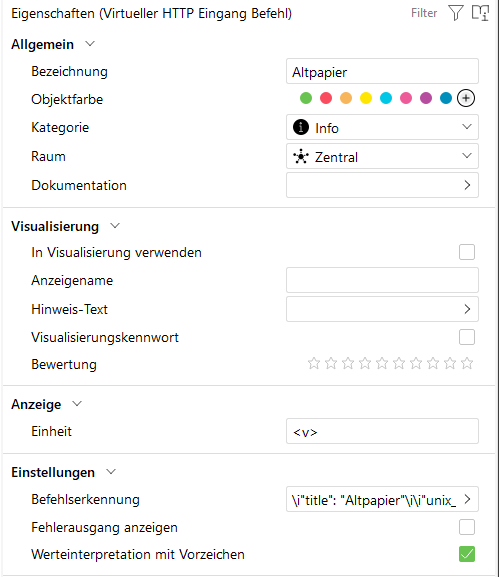
Loxone now has a large number (Unix time). That is not a calendar date yet – next is the conversion in the formula block.
-
Add a Formula Block: Insert a new Formula Block and connect the Virtual Input Command to
I1of the formula block.To display the Unix timestamp as a correct date in a Virtual Status, it needs to be converted:
- Loxone always counts from 01.01.2009
- Unix timestamp counts from 01.01.1970
- This results in a difference of 1,230,768,000 seconds
Insert the following formula into the formula block:
I1 - 1230768000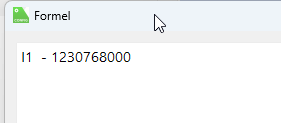
-
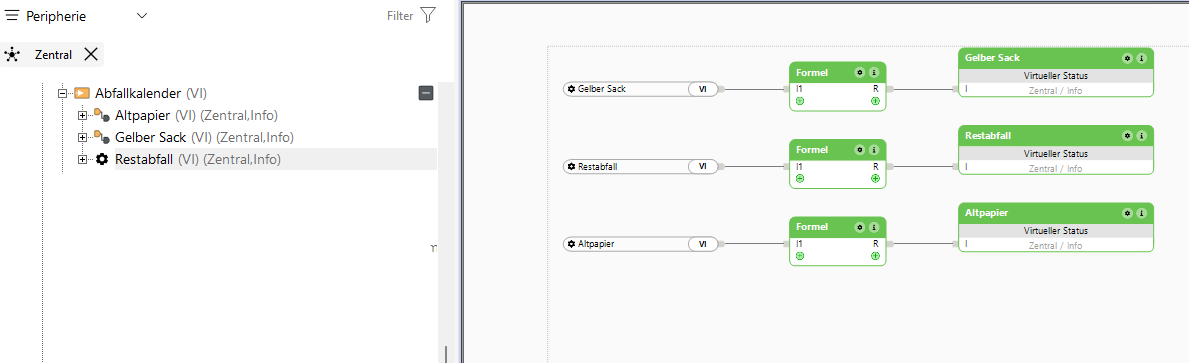
Add a Virtual Status: Insert a new Virtual Status and connect the result of the formula block to it. Enter the desired date format as the unit.
The result in the editor:
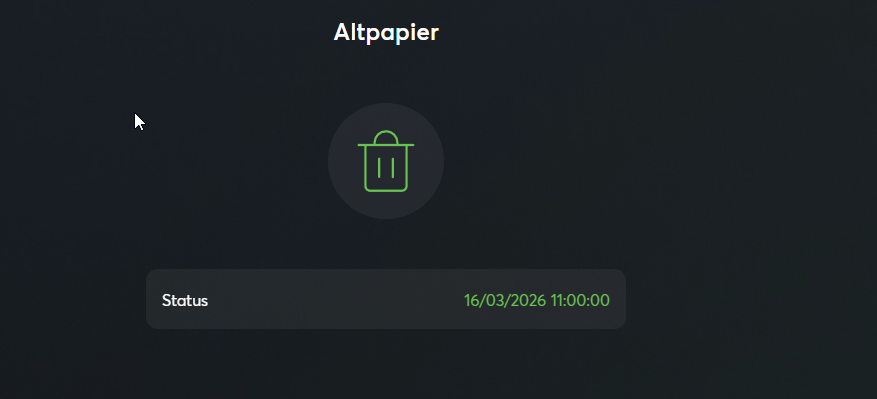
In the User-App it looks like this:
-
Logic & reminders (untested): Use
days_untilfor reminders without converting the Unix date. The analog value is simply the number of days:0= today,1= tomorrow,2= the day after.Untested: We have not rebuilt this reminder path in Loxone Config yet. The API fields are correct – the blocks below are a reasonable sketch. If it works for you (or does not), please let us know via the contact form.
Add a second HTTP Input Command (on the same virtual input as the date). Put the
days_untilpattern into command recognition – not theunix_datepattern:\i"title": "Altpapier"\i\i"days_until":\i\vComparator: connect it to this command’s analog value. Example “put the bin out tomorrow”:
I1 == 1Reminder on collection day itself:
I1 == 0. Evening before:I1 == 1. Two days before:I1 == 2.Output: Connect the comparator to a push notification or a light, for example. While
I1 == 1is true (the whole “tomorrow” day), each API poll would fire again. So trigger only once per day – e.g. in the evening via a clock.Use a separate command for bio, residual, paper, etc. – otherwise Loxone mixes the types. Leave the polling cycle at
3600seconds (hourly): with a 24h poll, Loxone often only notices the 12:00 switch the next day.